On this page
Build an AI Agent That Drafts a Terrain Analysis in MilX
Tutorial 15 of 17 · Expert · 60 min
Give an AI agent an area and a mission, and get back a .milxlyz file with obstacles, avenues of approach, key terrain and observation already drawn — a first draft you then check and finish in map.army.
The agent does exactly what the manual terrain analysis does, in the same OAKOC order. Do that tutorial first: you can only review the agent’s draft if you know what a good one looks like.
You need
- An AI agent that can run tools and write files — for example Claude Code, or an agent you build on an AI API.
- Python 3 for the file writer below, and access to terrain data for your area (see step 3).
- The example terrain-analysis-example.milxlyz as a pattern for the agent.
- An AI service your organisation approves for the data involved.
How the agent works
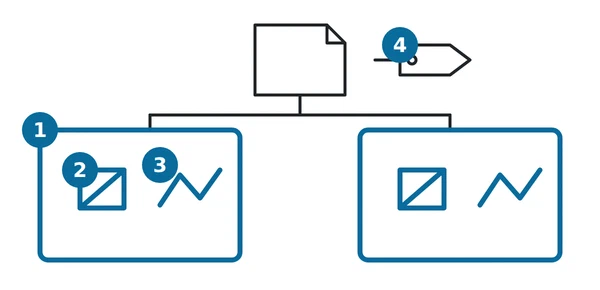
A language model cannot see the ground. Asked for a terrain analysis from memory, it invents plausible rivers and ridges. An accurate draft therefore needs three parts:
- Data tools that fetch real terrain facts for the area: elevation (to find steep slopes), rivers, forests, built-up areas, roads and bridges.
- The model that applies the OAKOC rules to those facts and decides what to draw.
- A writer that turns the decisions into a valid MilX® file — written by code, not typed by the model, so the format is always right.
map.army is not involved until the end: you load the finished file and review it there.
Step 1: Teach the agent the format
A MilX layer is XML, zipped as Layer.milxly inside a .milxlyz. Each graphic is a MIL-STD-2525C symbol code with its text modifiers, plus a list of points. Give the agent the example file and these rules in its instructions:
- Every symbol code has exactly 15 characters. The 2nd character is the affiliation (
Ffriend,Hhostile), the 4th the status (Ppresent,Aanticipated). - Points are WGS84:
Xis the longitude,Ythe latitude. - Multi-point graphics have a point order: an axis of advance takes the tip first, then the start, then a point behind the tip that sets the width of the arrowhead.
- Attribute values are validated by the MSS®. A wrong value —
60where three digits are required — makes the symbol disappear. Let the agent use only the text modifierTunless you verify others.
The full background is on AI with map.army and MilX File Format.
Step 2: Give it a fixed symbol vocabulary
Do not let the model choose symbols freely. Give it this table and tell it to use nothing else:
| OAKOC element | Symbol (MIL-STD-2525C) | Code | Points |
|---|---|---|---|
| Severely restricted terrain (NO-GO) | Obstacle Restricted Area | GFMPOGR-------- | area, 3 or more |
| River, ravine, embankment | Obstacle Line | GFMPOGL-------- | line, 2 or more |
| Enemy avenue of approach | Axis of Advance, Ground (hostile) | GHGPOLAG------- | tip, start, width |
| Key terrain | Point Of Interest | GFGPGPRI------- | 1 |
| Observation post | Observation Post / Outpost | GFGPDPO-------- | 1 |
| Where an avenue narrows | Named Area Of Interest | GFGPSAN-------- | area, 3 or more |
Every code comes from the list of MIL-STD-2525C symbols. The T text says why: NO-GO slopes over 45 %, K1 bridge La Punt.
Step 3: Feed it real terrain data
Give the agent tools that return facts, not maps. Common open sources:
- Elevation — a digital elevation model such as Copernicus DEM or your national survey’s model. The tool computes slope classes for the area: for example GO below 30 %, SLOW-GO 30–45 %, NO-GO above 45 % for tracked vehicles. Set the thresholds for your vehicles.
- Water, forest, built-up areas, roads, bridges — OpenStreetMap through the Overpass API, or your national topographic data.
Then instruct the agent in plain words:
Area of interest: west 9.84, south 46.54, east 10.03, north 46.66 (WGS84).
Mission: defend the valley against an enemy advancing from the north-east.
1. Call the elevation tool and the map-data tool for the area.
2. Mark NO-GO slope areas and linear obstacles (rivers) from the data.
3. Derive the enemy avenues of approach between the obstacles,
   wide enough for a mechanised company.
4. Mark key terrain (bridges, junctions, dominating heights) and one
   observation post per avenue; an NAI where each avenue narrows.
5. Return the graphics as a list for the writer. Use only the symbol
   table you were given. Give a reason in T for every graphic.
Step 4: Write the file with code
The agent passes its list to a small writer, which checks every graphic before it writes anything. This writer produced the example file:
import io, re, zipfile
from xml.sax.saxutils import escape

SIDC = re.compile(r"^[SG][FHNU][A-Z][PA][A-Z-]{11}$")

def check(sidc, points, bbox):
    if not SIDC.match(sidc):
        raise ValueError(f"not a 15-character 2525C code: {sidc}")
    need = 2 if sidc[4:7] == "OGL" else 3 if sidc[4:6] in ("OL", "OG", "SA") else 1
    if len(points) < need:
        raise ValueError(f"{sidc}: needs at least {need} points")
    west, south, east, north = bbox
    for lon, lat in points:
        if not (west <= lon <= east and south <= lat <= north):
            raise ValueError(f"{sidc}: {lon},{lat} is outside the area")

def graphic(sidc, points, attributes):
    symbol = f'<Symbol ID="{sidc}">' + "".join(
        f'<Attribute ID="{k}">{escape(v)}</Attribute>' for k, v in attributes.items()
    ) + "</Symbol>"
    pts = "".join(f"<Point><X>{x:.6f}</X><Y>{y:.6f}</Y></Point>" for x, y in points)
    return (f"<MilXGraphic><MssStringXML>{escape(symbol)}</MssStringXML>"
            f"<PointList>{pts}</PointList></MilXGraphic>")

def write_layer(path, name, graphics, bbox):
    for g in graphics:
        check(g[0], g[1], bbox)
    xml = ('<?xml version="1.0" encoding="UTF-8" standalone="no"?>'
           '<MilXDocument_Layer xmlns="http://gs-soft.com/MilX/V3.1" '
           'xmlns:xsi="http://www.w3.org/2001/XMLSchema-instance">'
           "<MssLibraryVersionTag>2025.02.20</MssLibraryVersionTag>"
           f"<MilXLayer><Name>{escape(name)}</Name><LayerType>Normal</LayerType>"
           "<GraphicList>" + "".join(graphic(*g) for g in graphics) + "</GraphicList>"
           "<CoordSystemType>WGS84</CoordSystemType><ViewScale>0.1</ViewScale>"
           "<SymbolSize>1</SymbolSize></MilXLayer></MilXDocument_Layer>")
    buffer = io.BytesIO()
    with zipfile.ZipFile(buffer, "w", zipfile.ZIP_DEFLATED) as z:
        z.writestr("Layer.milxly", xml)
    with open(path, "wb") as f:
        f.write(buffer.getvalue())

write_layer("terrain-analysis.milxlyz", "Terrain analysis (AI draft)", [
    ("GFMPOGL--------", [(9.885, 46.552), (9.925, 46.578), (10.0, 46.625)], {"T": "Inn"}),
    ("GHGPOLAG-------", [(9.89, 46.562), (10.01, 46.64), (9.90, 46.574)], {"T": "AA 1"}),
    ("GFGPGPRI-------", [(9.928, 46.582)], {"T": "K1 bridge La Punt"}),
], bbox=(9.84, 46.54, 10.03, 46.66))
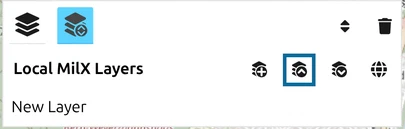
Load the result with Load MilX in the Layer-Manager, or publish it on a web server and open it with a ?layer= link.
.milxlyz is a ZIP file. Write it in binary mode, and keep it away from tools that convert line endings — a single converted byte makes it unreadable.Step 5: Check the draft before you trust it
The file loads even when the analysis is wrong. Review it on the map, ideally in the 3D view:
- Does every NO-GO area really sit on steep ground or water, and is no gap missing between them?
- Does each avenue of approach run between the obstacles, in the right direction, tip at the objective?
- Is every key terrain point on the bridge, junction or height its text names?
- Correct what is wrong in map.army, add what the data cannot know — the weather, the enemy’s equipment — and save the layer as yours.
The agent saves you the drawing, not the judgement. The analysis is ready when a person has checked it.
Next tutorial
Continue with Exchange overlays with C2 systems through NVG to hand the finished analysis to other systems. Reference: AI with map.army, Import Overlays, Load a MilX layer via URL parameter.
Last updated: