On this page
mapType Link Reference: Properties and Limits
This page is the reference for map.army mapType links: every property, the projections that work, attribution, and what a link cannot do. To build your first link, start with Connect Your Own Map Service to map.army.
Every property in detail
The extent property (see the table below) limits where the service is drawn: inside the box (1) the map is visible, outside it (2) the map is blank.

Properties both service types take
| Property | Meaning | Required |
|---|---|---|
type | wmts or wms. Anything else and the parameter is ignored. | Yes |
url | The service address. For WMTS an XYZ template containing {z}, {x} and {y}, plus {s} if you use subdomains. For WMS the endpoint. | Yes |
extent | The area the service actually covers, as [xmin, ymin, xmax, ymax] in WGS84 degrees — longitude first. It clips the layer, so outside it the map is blank. Defaults to the whole world. | No |
epsg | The coordinate system the service publishes in, as an EPSG code. Defaults to 3857. See Which projections work before using anything else. | No |
epsgExtent | A boundary in the units of epsg rather than degrees. This one defines the tile grid, not the layer clip, and is only meaningful for WMTS or for WMS with tiled: true — a plain untiled WMS has no tile grid and ignores it. | No |
zoomLevel | The lowest and highest zoom the service supports, as [min, max]. Asking for a zoom the server does not have produces empty tiles. | No |
credits | The attribution text. See Attribution and credits — it only takes effect together with creditsUrl. | No |
creditsUrl | The link behind that attribution text. | No |
WMTS only
| Property | Meaning | Required |
|---|---|---|
subdomains | The letters to rotate through the {s} placeholder, written as one string with no separators — abc means a, b and c. Providers offer these so a browser can fetch tiles from several hostnames at once. Omit it if your url has no {s}. | No |
tileSize | The tile edge in pixels. Defaults to 256, which is what almost every service uses; some newer ones serve 512. | No |
WMS only
| Property | Meaning | Required |
|---|---|---|
layers | The layer names to request, exactly as the service names them. Several are comma-separated. | Yes |
format | The image type as a MIME type — image/jpeg for photographic imagery, image/png where you need transparency. | Yes |
styles | The layer style, empty by default. Note the plural: a style key is ignored, which is easy to miss because the request still succeeds and simply uses the server’s default. | No |
version | The WMS specification version. Defaults to 1.3.0. Older servers may need 1.1.1, which differs in how it orders coordinates. | No |
tiled | true asks for the map as many small tiles, false as one large image per view. Tiled is usually faster and easier on the server; a few services only support one or the other. | No |
Which projections work
The map view itself is always Web Mercator. Your epsg tells the app what the service publishes in, and the map reprojects from it — but only for coordinate systems it knows.
3857(Web Mercator) and4326(WGS84 lon/lat) always work. They are built in.- Anything else is unsupported unless you have tested it. Other codes depend on a projection definition being registered before the map is built, and that does not reliably happen. A Swiss LV95 service (
2056) may work; an ETRS89/UTM service such as25832is very unlikely to.
If your service publishes only in a national grid, the dependable route is to ask your provider whether it also serves 3857 or 4326 — most do — rather than passing the national code and hoping.
Attribution and credits
credits and creditsUrl are optional to the app and usually not optional to your licence. Most map services, including OpenStreetMap and every national survey agency, require their attribution to appear wherever their imagery is shown.
Filled in, they appear in two places:
- In the app, as a link in the information panel — the i button in the bottom-right corner — reading
© Map Data:followed by yourcreditstext, pointing at yourcreditsUrl. Verified 2026-09-17: a link carrying OpenStreetMap’s attribution produced© Map Data: OpenStreetMap contributorsthere, exactly as the built-in maps produce© Map Data: Google. - In the footer of every export and print, which is the one that usually matters for a licence.

Note that the in-app credit is behind that button, not drawn on the map. If your licence requires attribution to be visible without a click, the export footer is where you can rely on it.
credits without creditsUrl emits nothing at all — no link in the panel and an empty export footer, with no warning either way. If attribution matters for your licence, set both and check an export before you publish one.The 3D view
Custom maps loaded with the mapType URL parameter are not supported in the 3D view. The 3D view uses a fallback map instead, so your service does not appear there; use the 2D map to see it.
Combining with other parameters
mapType is read independently of the other URL parameters, so one link can carry your map service and pre-load a layer with layer=. The parameters work in an iframe embed exactly as they do in a normal link.
mapType and a share stops being the link you sent. When the app opens a share, it rewrites the address bar to the share’s own address and keeps only the share’s parameters — so mapType vanishes from the URL. The map still works for that session, but the address is no longer copyable, bookmarkable or reloadable as the combined link. Keep the original somewhere if you need it again, and remember that the first-load reload needs it.Sharing a map you loaded this way
If you open map.army with a mapType link and then create a share, the person opening your share does not get your map service. They get their own default background with your layer on top of it.
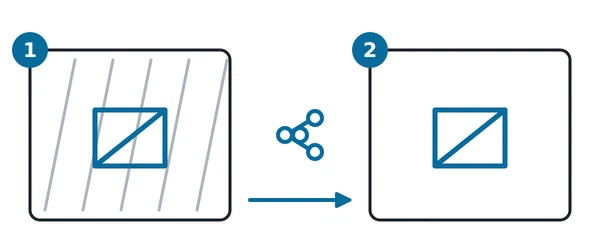
In the diagram: 1 your screen, with your own background map and your layer; 2 the recipient, with their own default background and your layer on top.
This is the most likely misunderstanding on this page, because nothing on your screen hints at it: your share looks right to you. The share stores which base map was selected but not its definition, and your service was never part of the recipient’s list, so their app falls back to its own default.
To give somebody your background map as well as your layer, send them the mapType link itself — with the layer= parameter if you want the layer to come with it — rather than a share.
When the link does not work
There are three distinct failures, and they look different on screen.
A blank map on the first load. Expected, for now — reload the page. See Open the link twice.
Your service is ignored and the normal maps appear. The JSON was readable but did not describe a usable service — a type that is not wmts or wms, a missing url, or a WMS without layers or format. The app falls back to its built-in list. Check the required properties for your service type.
No maps at all, after a reload too. Either the JSON could not be read — a stray comma, an unmatched brace, an unencoded character — or the service is not reachable in a way the app can use. For the JSON, paste it into any validator before encoding it. For the service, check three things in this order:
- Cross-origin access. map.army draws every tile through a canvas, so that brightness, hue and chroma can be applied and so the map can go into an export. That means your service must send an
Access-Control-Allow-Originheader permitting the app’s origin. A service that does not will show nothing at all, even though the very same tile URL opens perfectly in a browser tab. This is the most common cause of a correct-looking service that never appears, and the hardest to guess. - HTTPS. A browser blocks plain-HTTP imagery inside an HTTPS page.
- Reachability. Confirm the service answers from the machine running the browser, not only from inside your network.
If your service cannot be made to send cross-origin headers, the usual answer is to put a proxy that can in front of it, on your own infrastructure.
What a link cannot do
- Only one service per link. There is no way to pass a list, and no way to add yours alongside the built-in maps.
- It is not remembered. Each visit needs the link again.
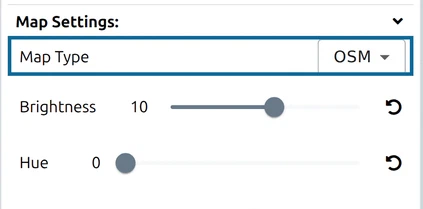
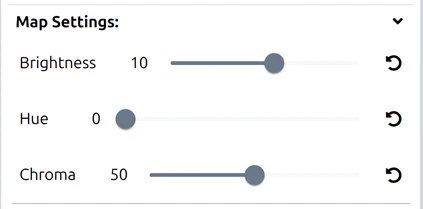
- It does not appear in the Options panel as a new entry — it takes the place of the whole list, and the Map Type row disappears.
- It does not travel in a share. See above.
epsg,epsgExtentandtileSizeare honoured here but not in a deployment’s own configuration file, so a link can describe a service more precisely than an installed deployment can.
For a permanent list of your own services, selectable like any other map and shared by everybody using that deployment, see Free vs Pro.
Last updated: