On this page
Military Map Symbols Explained: How to Read MIL-STD-2525
A military map symbol packs three answers into one sign: whose unit it is, how big it is and what kind of unit it is. map.army draws them to MIL-STD-2525C, the US standard that is closely aligned with NATO’s APP-6.
Read a unit symbol from the outside in: the frame first, then the marks above it, then the icon inside. All examples on this page are drawn by the same symbol service the app uses.
Frame shape and colour: friend or foe
The frame shows the affiliation — whether the unit is friendly, hostile, neutral or unknown. Shape and colour say the same thing twice, so the symbol still reads on a black-and-white printout.
| Symbol | Affiliation | Frame | Colour |
|---|---|---|---|
 | Friendly | Rectangle | Blue |
 | Hostile | Diamond | Red |
 | Neutral | Square | Green |
 | Unknown | Four-leaf (quatrefoil) | Yellow |
All four are the same infantry unit; only the affiliation changes. In map.army you change it in the Symbol Editor.
Unit size: the echelon marks
The marks above the frame give the echelon — the size of the unit. Dots are the smallest units, bars the next, crosses the largest.
| Symbol | Echelon | Mark |
|---|---|---|
 | Squad | One dot |
 | Platoon | Three dots |
 | Company | One bar |
 | Battalion | Two bars |
 | Brigade | One X |
 | Division | Two X |
The scale continues in both directions, from team to region. Two dots mark a section, three bars a regiment.
The icon: what kind of unit
The icon inside the frame shows the unit’s function. These are the ones you meet most often:
| Symbol | Unit | Icon |
|---|---|---|
 | Infantry | Diagonal cross from corner to corner |
 | Armour | An oval, like a track |
 | Field artillery | A filled dot |
 | Reconnaissance | One diagonal line |
 | Engineer | A bridge-like E shape |
 | Air defence | An arc at the bottom, like a dome |
 | Signal | A lightning zigzag |
 | Medical | A cross from edge to edge |
Icons combine: a mechanised infantry unit, for example, carries both the infantry cross and the armour oval.
Headquarters
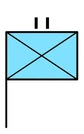
A staff — a line down from the left edge of the frame — marks a headquarters. The symbol above is the headquarters of a friendly infantry battalion: frame and icon for the unit, two bars for battalion, staff for headquarters. The staff’s foot is the exact position the symbol stands for.
Place these symbols on your map
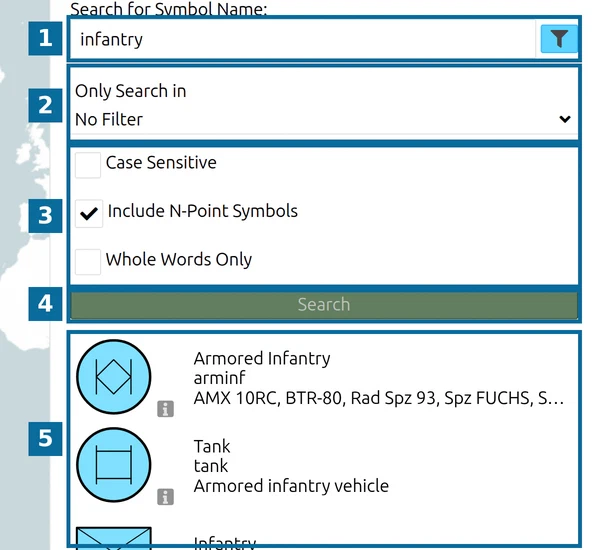
In map.army, every symbol on this page comes from the Symbol Gallery. Open MSS Symbol Search and type a unit name such as infantry in the language the app is set to, then click the map to place it. Affiliation and echelon are set afterwards in the Symbol Editor, together with the other modifiers.
One symbol as an image, without a map. symbol.army is the gs-soft symbol generator, built on the same symbol service. It opens a symbol straight from its 15-character code, for example the battalion headquarters above: www.symbol.army/?sidc=SFGPUCI—AF—. From there you can edit it and save it as an image.
Last updated: