On this page
Unit Settings: Distance, Angle, Time Zone and Formats
This page describes the Units of Measure group of the Options panel in map.army; the other general settings are on General Options.
In this area you can set the units for distance and angle.
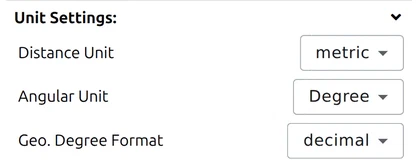
Distance Unit
Three systems are available:
| Setting | Base units |
|---|---|
| metric | metres and kilometres |
| imperial | feet and miles |
| nautical | nautical miles — for maritime and aeronautical work |
This one setting governs distances, areas and elevations everywhere in the app; there is no separate unit for area.
Angular Unit: degrees or NATO mils
Angles can be displayed in degrees (1 full circle = 360°) or NATO mils (1 full circle = 6400 mils).
Time zone
Sets the time zone used when a date and time is displayed or entered. The default is Z (+0) — UTC, the convention in military reporting. The chosen zone applies wherever map.army shows a timestamp, including the Date&Time field whose format characters are listed below.
Each MilX® layer remembers the time zone it was created in, as a military zone letter. Open layers made in another zone and map.army warns you: The following layers were created in a different time zone: followed by their names. That keeps date-time groups (DTG) from different units from being read in the wrong zone.
Geo. Degree Format
Sets how latitude and longitude are written wherever the app prints them:
| Setting | Looks like |
|---|---|
| decimal | 47.3769° |
| sexagesimal | 47°22'36.84" — degrees, minutes and seconds |
The choice applies to the cursor coordinate readout, the coordinate search and the point editor.
It is independent of the coordinate grid drawn on the map. The grid — MGRS, UTM and the rest — is a set of lines over the map; this setting only decides how WGS84 latitude and longitude are printed as numbers. See Coordinate settings.
Date and time format
The Date&Time setting offers a list of ready-made date-time-group formats — you pick one rather than typing your own:
| Preset | Built from |
|---|---|
| DTG (short) | ddhhmmwmmmyy — day, hour, minute, time-zone letter, month name, year |
| DTG (full) | ddhhmmsswmmmyy — as above, with seconds |
| DTG (time) | ddhhmmw — day, hour, minute, time-zone letter |
| hh:mm:ss | time only |
| hh:mm:ss DD/MM/YY, hh:mm:ss DD/MM/YYYY | time, then the date |
| DD/MM/YY, DD/MM/YYYY | date only |
| MM/YY, MM/YYYY | month and year |
The table below explains the characters those presets are built from, so you can read a preset and tell what it will produce:
| Sign | Description |
|---|---|
| Year | |
| yy | Year with 2 digits (00-99) |
| yyyy | Year with 4 digits (0000-9999) |
| Month | |
| m | Month as number without leading zero (1-12) |
| mm | Month as number with leading zero (01-12) |
| mmm | Name of month as abbreviation (depends on the server, for example: Jan) |
| mmmm | Name of month (depends on the server, for example: January) |
| Day | |
| d | Day as number without leading zero (1-31) |
| dd | Day as number with leading zero (01-31) |
| ddd | Name of day as abbreviation (depends on the server, for example: Sat) |
| dddd | Name of day (depends on the server, for example: Saturday) |
| Hour | |
| h | Hour without leading zero (0-23) |
| hh | Hour with leading zero (00-23) |
| am/pm | The time is displayed in 12 hour format, with am or pm |
| a/p | The time is displayed in 12 hour format, with a or p |
| ampm | The time is displayed in 12 hour format, with the server’s specific am/pm string |
| Minute | |
| m | Minute without leading zero (0-59) — an m directly after the hour is a minute; anywhere else it is a month |
| mm | Minute with leading zero (00-59), same rule |
| Time zone | |
| w | Military time-zone letter, e.g. Z — see Time zone above |
| Second | |
| s | Second without leading zero (0-59) |
| ss | Second with leading zero (00-59) |
| Signs | |
| ‘:’ | The server’s specific time separator |
| ‘/’ | The server’s specific date separator |
| ‘Xyz’ | Characters enclosed in double or single quotation marks are displayed as text |
| Local specific Date-time strings | |
| ddddd | Use the server’s specific short date format |
| dddddd | Use the server’s specific long date format |
| t | Use the server’s specific short time format |
| tt | Use the server’s specific long time format |
Last updated: