On this page
Share Vector and Image Layers from Online Sources
Beyond MilX symbology, map.army can publish vector and image layers that point at an online source (a URL) through the standard MilX Share workflow. Recipients of the share link see the layer with no file upload — the application fetches the content from the URL each time the share is opened. This is the path for KML / GeoJSON endpoints and for online-hosted raster layers.
Add a layer from an online source
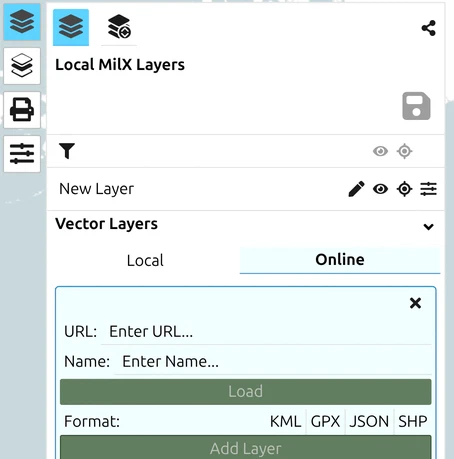
- Open the Layers Menu → Add Layer → Online.
- Paste the URL of the vector or image asset and confirm.
- The layer is added to the current map. Configure transparency / visibility as for any other layer.
Supported online sources include:
- Vector layers — public KML / GeoJSON endpoints, or any URL that returns a supported vector format.
- Image layers — direct URLs to PNG, JPG, or WebP assets, plus the matching world file (e.g.
.pgw/.jgw) for georeferencing.
Share the online-source layer
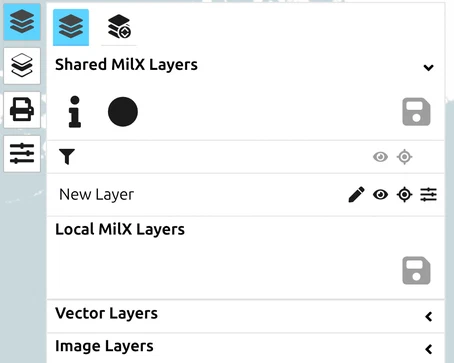
Once the online-source layer is on the map, the standard MilX Share workflow applies:
- Open Layers → Share Military Map → Create New MilX Share as for any layer.
- Move the online-source layer into the Share MilX Layer section via the Layer-Manager (see How to create a share — Add layers to your share).
- Save the share. Recipients now see the online-sourced content via the same link.
When to prefer this over a MilX-only share
A regular MilX share embeds your MilX symbology in the share itself; an online-source share leaves the underlying content at the URL. Use the online-source path when:
- The data is already published at a stable URL by someone else (a public KML feed of unit positions, a hosted image for an image layer).
- The data changes over time and you want recipients to always see the latest version without your having to push updates.
- The image layer is too large to be practical to embed.
For static one-off maps, a plain MilX share is simpler and survives the source going offline.
Last updated: