On this page
NVG Import and Export: NATO Vector Graphics
NVG (NATO Vector Graphics) is an XML-based exchange format defined by NATO for tactical situation overlays in command-and-control environments. map.army both reads and writes it, in the free hosted application — you do not need a project deployment for either direction.
Where NVG lives
NVG is not in the Layers panel and not in Vector Layers. It sits behind one button in the Layer-Manager:
- Open Layers, then Open Layer-Manager.
- On the layer group, click the globe — its tooltip reads Export/Import in other formats.
That opens a panel with three tabs:

Import an NVG file
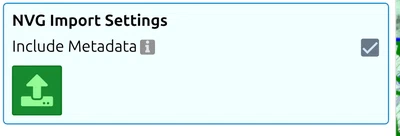
- Open the Layer-Manager and click the globe.
- Choose the NVG tab with the upward arrow. The panel is headed NVG Import Settings.
- Decide on Include Metadata — it applies the NVG document’s own metadata to the layers being created.
- Click the green load button. This opens the file picker.
- The file’s content arrives as one or more layers in the Layer-Manager.
What survives the import
Check the result rather than assuming it came across whole. Three things are worth knowing:
- Only MIL-STD-2525C symbols are read. A symbol given in another scheme —
app6a:,2525b:,app06d:oricon:instead of2525c:— is left out, with the warning NVG symbol ‘…’ is ignored. A2525c:code the app does not know is replaced by the closest symbol in the standard if one is found (warning: …has been mapped to the closest Symbol in the Standard), and left out if not. An overlay from another nation’s system can therefore arrive incomplete, or looking plausible and meaning something slightly different: read every warning, and look over the symbology before you work from it. The full list of what is read and written is on NVG interoperability. - Coordinates are read as WGS84 longitude and latitude in decimal degrees, which is what ADatP-4778 requires. The importer does not read a per-file coordinate-reference declaration and does not adapt to one, so a file that carries projected metres in its
xandyattributes is not rejected — the symbols simply land in the wrong place, with no error at all. Misplaced content is the symptom to watch for. - A file with no grouping becomes a single layer called
NVG Layer. Rename it in the Layer-Manager so it is not confused with the next import.
Once the layers are in, they behave like any MilX layer: edit, combine, save as .milxlyz or share. See Export Overlays and How to create a share.
Export to NVG
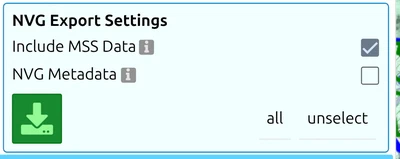
Choose the NVG tab with the downward arrow, tick the layers you want in the list below, and use the green download button. Two options sit above it:
| Option | What it does |
|---|---|
| Include MSS Data | Writes the MSS attributes into the file as NVG Extended Data, so more of your symbology survives the trip. On by default |
| NVG Metadata | Opens the document metadata editor described below. Off by default |
NVG metadata
There are two places to set metadata, and they are not the same thing:
- Document metadata — one set of values for the file you are about to export, edited from the NVG Metadata option in the export panel.
- Layer metadata — a per-layer override, in each layer’s own Settings panel under the heading NVG Metadata, with arrows for copying a label from one layer to another.
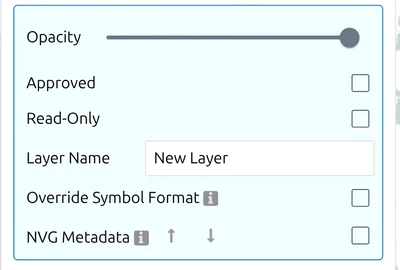
What you can set, and what map.army fills in
You edit the Title and the Confidentiality Label. The Creator, Publisher, Identifier and Created fields are shown read-only and are stamped by map.army at export time — so there is nothing to type there, and nothing you could type would reach the file.
The Confidentiality Label has four fields: Policy, Classification, Releasability and Created.
Releasability is read as country codes, not as free text. Entries are parsed as ISO 3166 three-letter codes — separated by spaces, commas or semicolons — and a prefix is completed to the closest matching code. Anything the app cannot match is flagged rather than carried through, so a releasability written as prose will not travel. Check what it made of your entry before you send the file.
Get the label right the first time. NVG is an exchange format, and the file will very likely outlive the conversation it was sent in.
Versions
map.army imports NVG 2.0.0 and later — a file with an older version, or with no version attribute at all, is refused with a message saying so. Export always writes 2.0.2; there is no version to choose.
NVG and MilX — when each is the right format
Both formats carry MIL-STD-2525 military symbology and tactical graphics (MIL-STD-2525C in map.army; no separate APP-6 symbol library); the on-the-wire shape differs, the semantics overlap heavily. A short decision filter:
- Source data is NVG — import it as described above. Once loaded, work in MilX for everything downstream.
- Destination is NVG-only (some NATO federated planning systems) — export NVG directly. Keep a
.milxlyzas your own master copy, because MilX carries attributes NVG does not. - Within a MIL-STD-2525 / MSS environment — MilX end-to-end is simpler and is the format gs-soft maintains alongside MSS. See About → MilX File Format.
- Exchanging with ATAK / CivTAK — neither NVG nor MilX is the right answer; see the FAQ entry Can map.army exchange data with ATAK / CivTAK / WinTAK?.
To discuss an NVG interoperability scenario:
Last updated: